2 min read

Bridge VMS Product Updates - February 26, 2026

Bridge VMS Product Updates - February 26, 2026

🚀 BridgeVMS Release Notes

Release number three of 2026 is here, and it's a good one.  This update is all about sharper workflows, better visibility, and a few quality-of-life wins.  The kind of improvements that quietly make your day easier as the year gathers pace.  Let’s take a look 👇 
 

💬 What’s new?

  • Expenses just got more flexible: We've rolled out several upgrades to how expenses work in BridgeVMS:
    • Open expenses - users can now input the claim values
    • Claim frequencies - set expenses to daily or weekly frequencies
    • Daily claims now require a claim date
    • Capped values can be applied to open expense types
    • Auto-claim option now available
Why it matters: more control, better accuracy, and fewer workarounds.
👉 For more information on how this works, check out our guide here: How to setup expense types
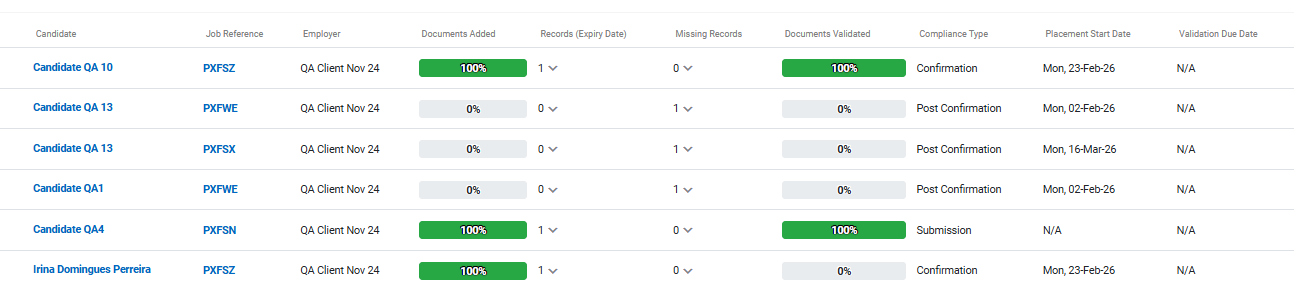
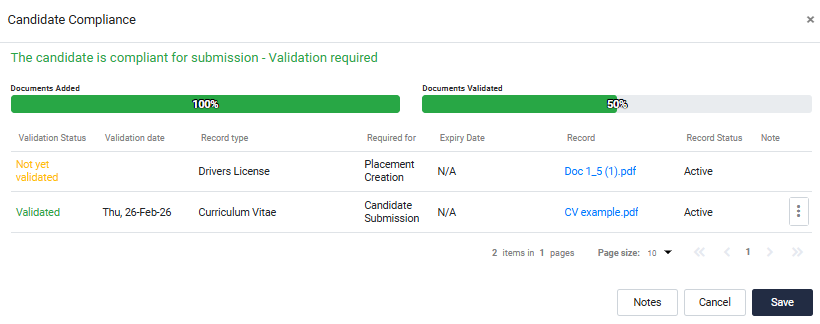
  • New compliance progress bar: Tracking compliance just got easier. We've added a progress bar to the compliance validation function so you can quickly see:
    • Progress on documents added
    • Progress on documents still requiring validation
You'll find this in the compliance validation module and within candidate submissions. Screenshots are below:
 
  • Due dates for compliance validation: You can now assign a due date for compliance validation to help monitor SLAs more effectively. To enable:
    • Go to Compliance Settings in Employer Category Settings
    • Select Enable due date for compliance validation
    • Enter the required validation timeframe (in days)
The calculated due date will appear against each document requiring validation.
  • Compliance document management improvements: We've made document handling more forgiving (and more transparent):
    • Removed documents now move to a candidate document archive available on the candidate profile
    • Documents can be permanently deleted from the archive if needed
    • New document status indicator (active vs Archived) in submissions
    • You can now edit, add or archive documents directly from the compliance section on a candidate submission
  • California Meal Break Rules monitoring: We've introduced a new function to monitor California meal break compliance.
    👉 Check out our guide on how this works How to set up California Meal Break Rules
  • Timesheet grid view for expenses: We've expanded visibility in the timesheet grid view. You can now view:
    • Expense Value
    • Expense Commission
    • Expense MSP Fee
    • Expense Charge.
    You can manage the visibility of these in the rate visibility modules, either in the Employer menu or the main site     settings.
  • New custom report fields: We've added new custom report fields to the custom report builder:
    • PO number - associated to the timesheet
    • Meal break compliance status - associated to the timesheet
    • Break intervals - associated to the timesheet
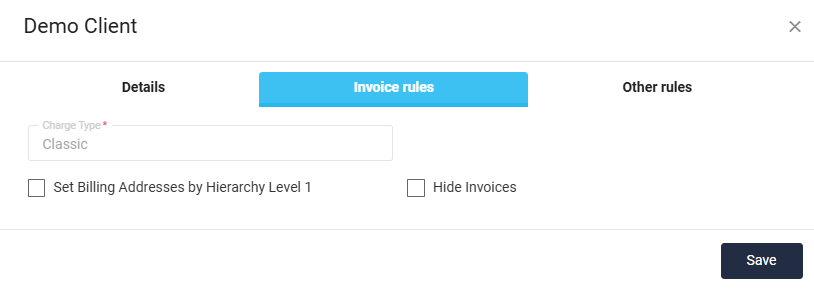
  • Hide invoices functionality: you can now hide invoices from Employer and Agency users via a new Hide Invoices setting (Employer profile > Invoice Rules).
When enabled:
  • Invoices remain visible to MSP users
  • Invoices are hidden from Employer and Agency users
 
Simple, but powerful when tighter visibility control is needed, especially if using an integrated system for invoicing.
  • Clearer rate change action: Adding a new effective date rate just got easier. Instead of being tucked behind the ellipsis menu, you'll now see an "Add new effective date rate" button directly in the rate change module. Less hunting, more doing.

  • Reporting improvements: We've made some under-the-hood reporting upgrades to improve performance and stability:
    • Reports will now run quicker
    • Preview now shows a maximum of 100 items
    • Added memory check to manage large report downloads.


🐞 Fixes & Optimisations:

Fresh clean-up crew reporting for duty. Here’s what we've sorted:

  • DE invoice subtotals – Now tallying correctly.
  • Bulk candidate confirmation – Was giving users an error, this is now resolved.
  • Approved timesheets showing in pending status – The issue was linked to a cron job for reminders, this is now fully resolved.
  • Duplicate hierarchy entries - Bug fixed to prevent duplicate hierarchy entries being entered via the hierarchy data loader.
  • Other small fixes - the quiet kind that keep everything running smoothly.

That’s it for this release! A strong set of updates to keep 2026 moving in the right direction.

📬 Got feedback? Need support? Or just want to say hello? Drop us a note via BridgeVMS Support.

As always, thanks for being part of the journey. Onward ✨

Bridge VMS Product Updates - September 22, 2025

Bridge VMS Product Updates - September 22, 2025

🚀 BridgeVMS Release Notes Another drop, another set of upgrades to keep your workflows sharp. Here’s what just landed 👇

Read More
Bridge VMS Product Updates - October 22, 2024

Bridge VMS Product Updates - October 22, 2024

We’re excited to let you know that we have successfully completed anew release to the live BridgeVMS system. This one’s a bit like a great road...

Read More
Bridge VMS Product Updates - August 06, 2024

Bridge VMS Product Updates - August 06, 2024

We’re excited to announce that we have successfully completed a new release to the live BridgeVMS system. While many of the enhancements were made...

Read More