2 min read

Bridge VMS Product Updates - June 08, 2026

Bridge VMS Product Updates - June 08, 2026

🚀 BridgeVMS Release Update

A new release has landed!  This one is all about refining existing functionality, improving clarity, and smoothing out a few areas based on your feedback.  There are also a handful of behind-the-scenes improvements helping everything run that little bit better.  Let’s take a look 👇
 

💬 What’s new?


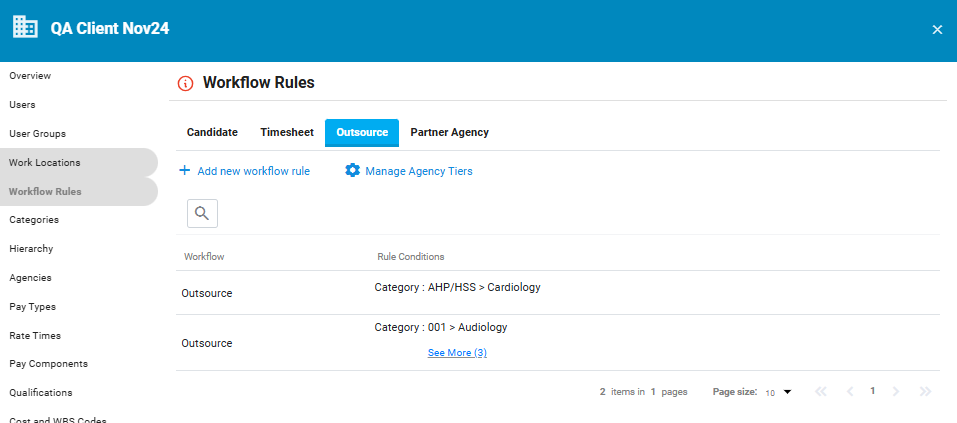
  • Custom labels for agency tiers: Following the recent enhancements to outsource rules, we've now added the ability to rename your agency tiers.

    Instead of being tied to the default tier names, you can now create labels that better reflect how your organisation manages its supply chain.

    To configure this, head to Workflow Rules > Outsource Settings on the Employer profile and select Manage Agency Tiers.
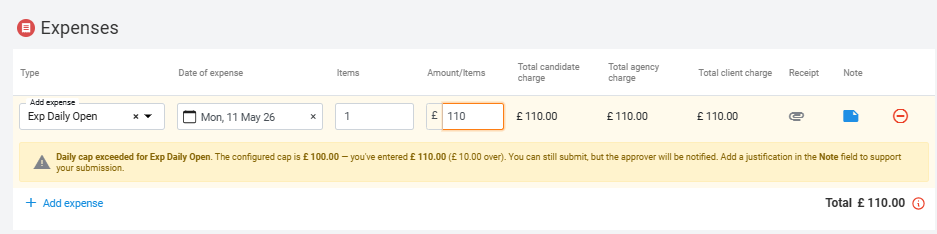
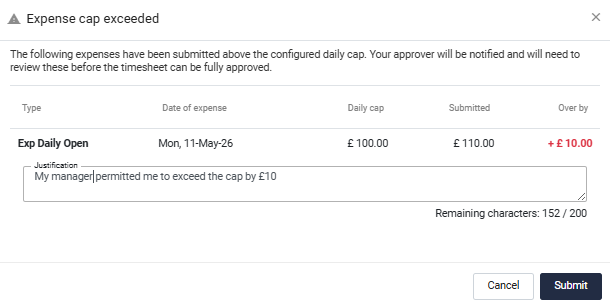
  • Capped expenses just got clearer: We've listened to feedback and made several improvements to capped expense validation.  You'll now see cap breach warnings in real time as values are entered, making it immediately clear when a claim exceeds the configured limit.

    We've also introduced:
    • Mandatory justifications when a cap is exceeded
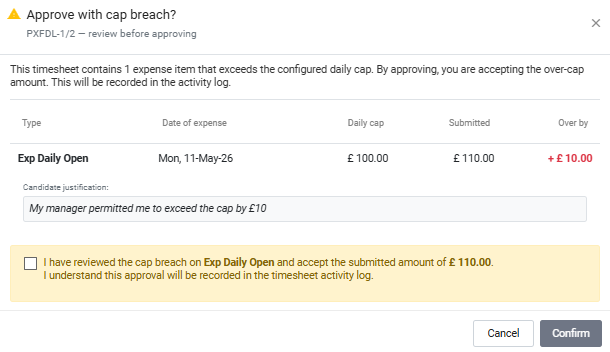
    • An acknowledgement step for timesheet approvers reviewing claims that exceed the cap
The result?  Better visibility, stronger controls, and fewer surprises during approval.
  • Smarter job status updates: Previously, if candidates were submitted and subsequently rejected, jobs could remain in a Submitted status even when there were no active submissions remaining.  We've updated this behaviour.  Jobs with no active submissions will now automatically return to Outsourced status and reappear in dashboard views for jobs awaiting candidates.  This makes it much easier for agencies to identify opportunities that still require submissions.
  • New Bank/Internal Pool only flag: We've added a new indicator for jobs that have been distributed exclusively to your Bank or Internal Pool workforce.  You'll find this flag within the Job Details tab under the job information section, making it easier to identify these roles at a glance.
  • New reporting field: The Custom Report Builder now includes a new field that identifies whether a job has been marked as Bank/Internal Pool Only.  Perfect for reporting, analysis, and tracking internal workforce utilisation.
  • Clearer rate displays on jobs and placements: Managing effective-date rates just became much easier.  The currently active rate is now displayed by default on jobs and placements, removing the confusion that can occur when multiple historic and future rates exist.

    Need more detail?  Simply select View Rate Schedule to see the full rate history and any upcoming rate changes.
  • Candidate name placeholder for placement cancellation notifications: We've added a new Candidate Name placeholder to the Placement Cancellation by Managed Service notification template.  This makes cancellation notifications far more informative by clearly identifying which candidate's placement has been cancelled.  You can configure this via Main Site Settings > Notification Templates

    Need a hand setting it up?  The
    BridgeVMS Support team will be happy to help.


🐞 Fixes & Optimisations:

Our clean-up crew's been busy behind the scenes 🧹. Here’s a snapshot:

  • Tax overrides - a fix has been made to the way overrides are processed and applied.
  • Invoice exports - Resolved an issue preventing successful exports.
  • Placement ending daily summary notifications - future dated placements will not appear in the placement ending daily summary notification now.
  • Extension approvals for daily jobs - issue resolved.
  • Additional bug fixes - a collection of smaller improvements and platform refinements to keep everything running smoothly.

That’s a wrap for this release!  Nothing flashy this time around, just a collection of thoughtful improvements designed to make everyday tasks a little clearer, a little faster and a little easier.

📬 Got feedback?  Need support?  Or need a hand?  Drop us a note via BridgeVMS Support.

As always, thanks for being part of the journey 🙌